
TVET Programme 2026: How to Fix Dashboard Login Issues and Reset Your Password Successfully

TVET Programme 2026: How to Fix Dashboard Login Issues and Reset Your Password Successfully
TVET Programme Dashboard Access Issue: What Applicants Need to Know
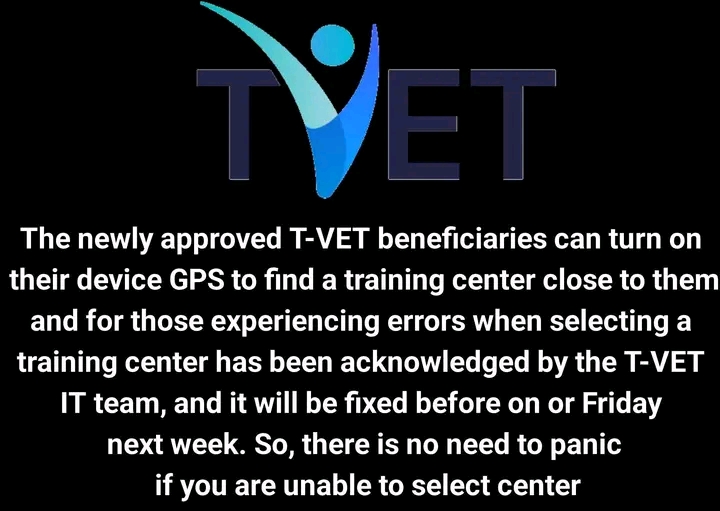
Thousands of applicants under the Technical and Vocational Education and Training (TVET) Programme have recently reported challenges accessing their dashboards after completing registration. This issue has caused confusion and concern, especially among candidates who are eager to track their application status, confirm placement, or proceed with the next stage of the programme.
If you are experiencing login difficulties, there is no need to panic. Recent updates indicate that most of these issues are minor and can be resolved by following the correct steps. This guide explains everything you need to know about accessing your TVET dashboard, resetting your password, and ensuring your account is fully functional.


Why Applicants Are Experiencing Login Issues
Dashboard access problems are common during large-scale programmes like TVET, especially when thousands of users attempt to log in at the same time. Some of the most frequent causes include:
- Incorrect login credentials (wrong phone number or password)
- Forgotten passwords
- System delays or updates
- Cache or browser-related issues
- Multiple registrations or account conflicts
In many cases, the issue is not with the system itself but with login details or temporary technical glitches.
Correct Login Details: What You Should Use
To access your TVET dashboard successfully, ensure you are using the correct credentials:
- Username: Your registered phone number
- Password: The password you created during registration
It is important to note that your phone number must be entered exactly as it was used during registration. Even small differences, such as missing digits or incorrect formatting, can prevent access.
Forgot Your Password? Here’s What to Do
If you cannot remember your password or your login attempt fails, the best solution is to use the “Forgot Password” feature. This option has now been fully restored and is working effectively.
Follow these steps to reset your password:
- Visit the official dashboard link: tvet.education.gov.ng
- Click on “Forgot Password”
- Enter your registered phone number
- Follow the instructions sent to your device (via SMS or email)
- Create a new password
- Log in again using your new credentials
Applicants who have tried this method since the recent system update have reported successful access without further complications.
Password Reset Feature Now Fully Functional
According to the latest update, the password reset feature began functioning properly as of yesterday. This means applicants who previously faced errors or delays while trying to reset their passwords can now retry the process with a high chance of success.
If you attempted a reset earlier and it didn’t work, it is strongly advised to try again now.
Tips to Avoid Login Problems
To ensure smooth access to your TVET dashboard, consider the following best practices:
- Save your login details securely after resetting your password
- Use a stable internet connection
- Avoid multiple login attempts in a short time
- Clear your browser cache or try a different browser
- Ensure your phone number is active and accessible
These simple steps can significantly reduce the chances of encountering login issues again.
What If You Still Can’t Access Your Dashboard?
If you have followed all the steps and still cannot log in, there may be a deeper issue with your account. In such cases, you should:
- Contact your assigned training centre
- Provide proof of registration (such as confirmation email or SMS)
- Share screenshots of any error messages
Your training centre is in the best position to escalate the issue and provide further assistance.
Importance of Accessing Your Dashboard
Your TVET dashboard is a critical part of the application process. It allows you to:
- Check your application status
- Confirm training centre placement
- Receive important updates and notifications
- Upload required documents
- Track programme progress
- Failure to access your dashboard on time could result in missing important deadlines or updates.
High Demand Causing Temporary Delays
It is worth noting that the TVET Programme has attracted a large number of applicants nationwide. As a result, temporary delays and system slowdowns are expected. However, these are usually resolved quickly by the technical team.
Applicants are encouraged to remain patient and avoid unnecessary panic, as most issues are temporary.
Final Advice for Applicants
If you are part of the TVET Programme and facing dashboard access issues, focus on the following key actions:
- Double-check your login credentials
- Use the “Forgot Password” option if needed
- Retry the process now that the system is stable
- Reach out for support only if the issue persists
By following these steps, you should be able to regain access to your account and continue your application process smoothly.
Conclusion
The recent dashboard access issues experienced by TVET applicants are largely resolved, especially with the password reset feature now functioning effectively. Most users can now log in successfully by using the correct credentials or resetting their passwords.
As the programme progresses, staying informed and proactive is essential. Ensure you access your dashboard regularly, keep your login details safe, and follow official updates to avoid missing any important information.
The TVET Programme remains a valuable opportunity for skill development and career growth, and resolving these minor technical issues is just one step toward benefiting from it.